![people element logooo.png]](https://20709424.hs-sites-na2.com/hs-fs/hubfs/people%20element%20logooo.png?height=50&name=people%20element%20logooo.png)
People Element calculates favorability using higher response values as favorable responses. For example, on a standard 1–5 agreement scale, 4s and 5s are interpreted as favorable. On a negatively worded question, disagreement may actually represent the favorable response, even though it has a lower numeric value.
Some survey methodologies, such as AHRQ's Surveys on Patient Safety Culture (SOPS), intentionally mix positively and negatively worded questions. Reverse Coding ensures these questions point in the same direction when calculating favorability and sentiment.
When should I use Reverse Coding?
Important: Reverse Coding is uncommon and should only be used when required by your survey's scoring methodology.
Use Reverse Coding when your survey methodology specifically requires a negatively worded question to be scored in the opposite direction.
For example:
Positively worded:
People support one another in this department.
-
Agreeing with this statement indicates favorable sentiment.
Negatively worded:
People in this department are reluctant to help one another.
-
Disagreeing with this statement indicates favorable sentiment.
Without Reverse Coding, People Element's standard favorability logic would treat the higher agreement values on both questions as more favorable. As a result, the negatively worded question may appear to be scored incorrectly.
When Reverse Coding is enabled, the platform reverses the value used for calculations so the favorable response to the negatively worded question is scored consistently with favorable responses to positively worded questions.
How does Reverse Coding work?
When Reverse Coding is enabled, People Element automatically reverses the numeric value used for analytics and reporting.
For a 1–5 scale:
| Participant Response | Value Used for Scoring |
|---|---|
| 1 | 5 |
| 2 | 4 |
| 3 | 3 |
| 4 | 2 |
| 5 | 1 |
For example, if a participant selects 1 – Strongly Disagree on a reverse-coded question, the platform uses a value of 5 when calculating applicable favorability and sentiment.
The participant's actual response does not change. Reverse Coding changes how the response is scored, not what the participant selected.
Reverse Coding also works with all other numeric scales, including 1–10 and 1–7 scales.
How to enable Reverse Coding
Reverse Coding is configured for individual questions in Survey Builder.
- Open your survey in Survey Builder.
- Select the question you want to configure.
- Open the question settings.
- Locate Reverse code near Require this question.
- Check the Reverse code box.
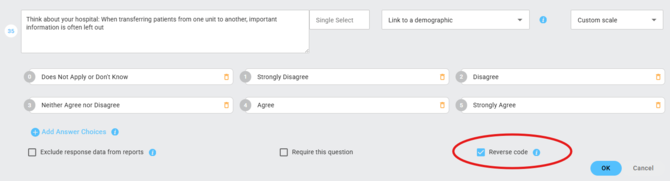
- You will be prompted with a confirmation message. Click Yes to continue.

The option is available for Single Select questions using a numeric agreement scale. Unsupported question or answer types will not display the option.
What will survey participants see?
Nothing changes for participants.
They will continue to see the original question wording, answer labels, and answer order. Reverse Coding occurs behind the scenes during analytics and reporting.
How will my data and results appear?
For questions with Reverse Coding enabled, People Element uses the reverse-coded value for applicable favorability, sentiment, dashboard, and analytics calculations.
For example, consider the negatively worded question:
Staff feel their mistakes are held against them.
If 1 – Strongly Disagree represents the favorable response, Reverse Coding converts the value used for scoring from 1 to 5. This allows People Element's favorability calculations—which interpret higher values as favorable—to score the response appropriately.
Your participant's original response is still preserved. If you have access, Raw Data downloaded from the report tab represents what the participant actually selected alongside the reverse-coded answer.
Example of Raw Data export view of reverse coded question:
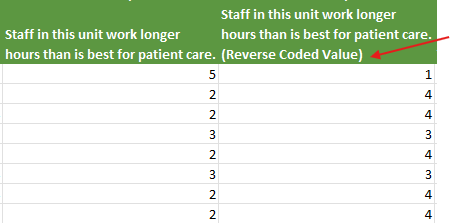
Values such as 0, N/A, blank/null responses, and non-numeric values are not reverse coded and continue to follow the platform's standard reporting rules.
What if I enable Reverse Coding after collecting responses?
Use caution when changing Reverse Coding on a question that has already collected responses. THIS CANNOT BE UNDONE. Un-checking the 'Reverse Coding' box and saving the survey will not remove the reversed scale.
If you enable Reverse Coding after responses have been submitted, existing responses for that question will be recalculated using the new setting.
This may update historical:
- Dashboard results
- Favorability metrics
- Sentiment calculations
- Analytics and reporting data
If you cancel, no recalculation occurs and your existing results remain unchanged.